Security Magazine logo
search
cart
facebook twitter linkedin youtube
  • Sign In
  • Create Account
  • Sign Out
  • My Account
Security Magazine logo
  • NEWS
    • Security Newswire
    • Technologies & Solutions
  • MANAGEMENT
    • Leadership Management
    • Enterprise Services
    • Security Education & Training
    • Logical Security
    • Security & Business Resilience
    • Profiles in Excellence
  • PHYSICAL
    • Access Management
    • Fire & Life Safety
    • Identity Management
    • Physical Security
    • Video Surveillance
    • Case Studies (Physical)
  • CYBER
    • Cybersecurity News
    • More
  • BLOG
  • COLUMNS
    • Career Intelligence
    • Cyber Tactics
    • Cybersecurity Education & Training
    • Leadership & Management
    • Security Talk
  • EXCLUSIVES
    • Annual Guarding Report
    • Most Influential People in Security
    • The Security Benchmark Report
    • Top Guard and Security Officer Companies
    • Top Cybersecurity Leaders
    • Women in Security
  • SECTORS
    • Arenas / Stadiums / Leagues / Entertainment
    • Banking/Finance/Insurance
    • Construction, Real Estate, Property Management
    • Education: K-12
    • Education: University
    • Government: Federal, State and Local
    • Hospitality & Casinos
    • Hospitals & Medical Centers
    • Infrastructure:Electric,Gas & Water
    • Ports: Sea, Land, & Air
    • Retail/Restaurants/Convenience
    • Transportation/Logistics/Supply Chain/Distribution/ Warehousing
  • EVENTS
    • Industry Events
    • Webinars
    • Solutions by Sector
    • Security 500 Conference
  • MEDIA
    • Interactive Spotlight
    • Photo Galleries
    • Podcasts
    • Polls
    • Videos
      • Cybersecurity & Geopolitical Discussion
      • Ask Me Anything (AMA) Series
  • MORE
    • Call for Entries
    • Classifieds & Job Listings
    • Continuing Education
    • Newsletter
    • Sponsor Insights
    • Store
    • White Papers
  • EMAG
    • eMagazine
    • This Month's Content
    • Advertise
  • SIGN UP!
Logical Security

5 Top Security Questions about iPhone Biometric Authentication
By Jerry Irvine
September 1, 2013

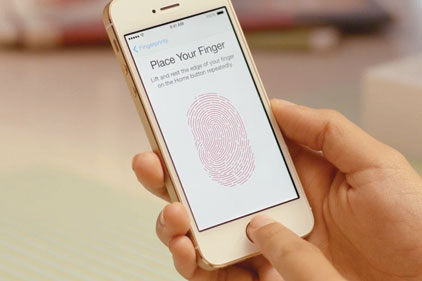
iphone5sfingerprint Apple is acknowledging a common complaint from online and mobile banking: the need for stronger authentication.

By the addition of a fingerprint sensor to the iPhone 5S’s Home button, Apple is mitigating the risk of username and password hacking. Users register their print within the device, after which they would be able to unlock the phone by placing a finger or thumb on the button.

But the approaching release of the new smartphone is not without doubts and questions, especially on the security side:

So how does the iPhone fingerprint technology work?

The new iPhone home button is a high-definition camera. When you register your fingerprint, the camera can take a 550-pixel-per-inch photograph for up to five of your fingers. The phone then encodes these photographs into digital representations, stores them in a separate partition of the phone and then uses them for comparison when you access your iPhone.

Why are fingerprint technology and other biometric-based security the next big things… and how can we make them even more secure?

Unfortunately smartphone and tablet authentication has become a nuisance for most people today. In fact, more than 50 percent of all users do not implement passwords or PINs on their mobile devices, either due to the inconvenience or simply because they are not aware of the risks of unprotected devices. As a result, Apple and other mobile device manufacturers are being challenged to increase security and usability. Passwords are an annoyance for most. Unless you utilize complex password strategies – including alpha-numeric, upper and lower case and special characters, passwords may be easily cracked. As a result, biometric authentication such as fingerprints, retinal scans and facial recognition are simply more convenient for the user.

Biometric solutions added with other measures have the ability to increase authentication security. Traditional authentication is performed with a single factor process that employs user IDs and passwords. Multi-form factor authentication strategies have been around for a while and must include at least two of the following items:

  • Something you know – User ID / passwords
  • Something you have – Smart card (your phone)
  • Something you are – Biometric (your fingerprint, your retinal scan, your face, etc.)

The addition of other authentication requirements increases the overall security of the access controls. Because you must have your phone and your fingerprint, access is more secure. A thief may be able to steal your phone and hack your password, but he or she would not have access to your biometric. Nevertheless, requiring all three attributes (phone, biometric and PIN/password) would increase the security of the device even further.

What security risks should iPhone users look out for?

While Apple stated that the digital representation of the fingerprint could be encrypted and stored in a separate secure partition on the iPhone chip, it may still be possible (at some point) for hackers and virus developers to create a malicious application that could gain access and copy your fingerprint data. Obtaining this information could not only allow them to gain access to your phone, but could significantly increase their ability to steal your identity, allowing them to gain access to your personally identifiable information.

As always users should practice safe computing practices.

1.    Keep iOS and applications up-to-date. Patches and updates come out on applications when known bugs and vulnerabilities are found. Updating your system increases your device’s security.

2.    Install anti-virus solutions if they are available. While most mobile devices still have few antivirus solutions available, they are becoming more prevalent. Find solutions from trusted software manufacturers, install them and keep them updated.

3.    Do not browse unfamiliar websites, as they may contain socially unacceptable content. These sites are frequently filled with viruses, bots and other malicious applications.

4.    Do not open attachments or web links sent to you in emails or texts, especially from unknown users. These attachments and links are often sent from users with infected devices or directly from malicious sites/users.

5.    Do not use publically accessible Wi-Fi networks where malicious users may easily gain access to your devices. Hackers sit in coffee shops and airports monitoring and “sniffing” wireless network traffic for your user IDs, passwords and other personally identifiable information.

6.    Turn off external access to your devices. Viruses and malicious applications can be pushed to your devices via Wi-Fi, Bluetooth and NFC connections. If you are not using them, disable them.

What fingerprint apps are available for non-iPhone users?

Fingerprint devices for desktops, laptops and PDAs have been around for years. Devices can be attached via multiple connections including Bluetooth, USB and serial ports. Additionally, software-only solutions exist for devices as well, including fingerprint software for Android devices. Fingerprint solutions for mobile devices to date have been cumbersome and inaccurate, causing other manufacturers to eliminate or postpone their products. The implementation of the iPhone fingerprint reader will undoubtedly cause other manufacturers to rethink and redesign their solutions.

Where is the future of fingerprint scanning heading?

As previously mentioned, biometric solutions have been offered for quite some time. In fact, Microsoft’s workstation and Active Directory environments have the ability to fully integrate biometric and smart card authentication. However, the iPhone fingerprint solution is the largest consumer-based biometric offering to-date, and has brought fingerprint authentication out for public consumption. Additionally, by already integrating the fingerprint authentication with the Apple iTunes, App and iBook store purchases, Apple has paved the way for other biometric authentication processes across the web. While Apple is not currently allowing access to fingerprint authentication to other vendors or websites, it is not hard to believe it will happen very soon. 

KEYWORDS: biometric authentication fingerprint fingerprint authentication mobile security smartphone biometrics

Share This Story

Looking for a reprint of this article?
From high-res PDFs to custom plaques, order your copy today!

CIO of Prescient Solutions and member of the National Cyber Security Task Force

Recommended Content

JOIN TODAY
To unlock your recommendations.

Already have an account? Sign In

  • Iintegration and use of emerging tools

    Future Proof Your Security Career with AI Skills

    AI’s evolution demands security leaders master...
    Columns
    By: Jerry J. Brennan and Joanne R. Pollock
  • The 2025 Security Benchmark Report

    The 2025 Security Benchmark Report

    The 2025 Security Benchmark Report surveys enterprise...
    The Security Benchmark Report
    By: Rachelle Blair-Frasier
  • The Most Influential People in Security 2025

    Security’s Most Influential People in Security 2025

    Security Magazine’s 2025 Most Influential People in...
    Most Influential People in Security
    By: Security Staff
Manage My Account
  • Security Newsletter
  • eMagazine Subscriptions
  • Manage My Preferences
  • Online Registration
  • Mobile App
  • Subscription Customer Service

More Videos

Sponsored Content

Sponsored Content is a special paid section where industry companies provide high quality, objective, non-commercial content around topics of interest to the Security audience. All Sponsored Content is supplied by the advertising company and any opinions expressed in this article are those of the author and not necessarily reflect the views of Security or its parent company, BNP Media. Interested in participating in our Sponsored Content section? Contact your local rep!

close
  • critical event management
    Sponsored byEverbridge

    Why a Unified View Across IT, Continuity, and Security Makes or Breaks Crisis Response

  • Charlotte Star Room
    Sponsored byAMAROK

    In an Uncertain Economy, Security Is a Necessity - Not an Afterthought

  • Sureview screen
    Sponsored bySureView Systems

    The Evolution of Automation in the Command Center

Popular Stories

Cybersecurity trends of 2025

3 Top Cybersecurity Trends from 2025

Red laptop

Security Leaders Discuss SitusAMC Cyberattack

Green code

Logitech Confirms Data Breach, Security Leaders Respond

Neon human and android hands

65% of the Forbes AI 50 List Leaked Sensitive Information

The Louvre

After the Theft: Why Camera Upgrades Should Begin With a Risk Assessment

Top Cybersecurity Leaders

Events

September 18, 2025

Security Under Fire: Insights on Active Shooter Preparedness and Recovery

ON DEMAND: In today’s complex threat environment, active shooter incidents demand swift, coordinated and well-informed responses.

December 11, 2025

Responding to Evolving Threats in Retail Environments

Retail security professionals are facing an increasingly complex array of security challenges — everything from organized retail crime to evolving cyber-physical threats and public safety concerns.

View All Submit An Event

Products

Security Culture: A How-to Guide for Improving Security Culture and Dealing with People Risk in Your Organisation

Security Culture: A How-to Guide for Improving Security Culture and Dealing with People Risk in Your Organisation

See More Products

Related Articles

  • Encryption Future - Security Magazine

    Security Trial: Are Biometric Authentication Systems Fulfilling Encryption Standards?

    See More
  • thermal imaging

    Top 5 myths about temperature checks

    See More
  • Biometric authentication, fingerprint on phone

    Biometric authentication sees increase in adoption during the pandemic

    See More

Related Products

See More Products
  • Hospitality Security: Managing Security in Today's Hotel, Lodging, Entertainment, and Tourism Environment

  • 9780367259044.jpg

    Understanding Homeland Security: Foundations of Security Policy

  • security culture.webp

    Security Culture: A How-to Guide for Improving Security Culture and Dealing with People Risk in Your Organisation

See More Products
×

Sign-up to receive top management & result-driven techniques in the industry.

Join over 20,000+ industry leaders who receive our premium content.

SIGN UP TODAY!
  • RESOURCES
    • Advertise
    • Contact Us
    • Store
    • Want More
  • SIGN UP TODAY
    • Create Account
    • eMagazine
    • Newsletter
    • Customer Service
    • Manage Preferences
  • SERVICES
    • Marketing Services
    • Reprints
    • Market Research
    • List Rental
    • Survey/Respondent Access
  • STAY CONNECTED
    • LinkedIn
    • Facebook
    • YouTube
    • X (Twitter)
  • PRIVACY
    • PRIVACY POLICY
    • TERMS & CONDITIONS
    • DO NOT SELL MY PERSONAL INFORMATION
    • PRIVACY REQUEST
    • ACCESSIBILITY

Copyright ©2025. All Rights Reserved BNP Media.

Design, CMS, Hosting & Web Development :: ePublishing