Security Magazine logo
search
cart
facebook twitter linkedin youtube
  • Sign In
  • Create Account
  • Sign Out
  • My Account
Security Magazine logo
  • NEWS
    • Security Newswire
    • Technologies & Solutions
  • MANAGEMENT
    • Leadership Management
    • Enterprise Services
    • Security Education & Training
    • Logical Security
    • Security & Business Resilience
    • Profiles in Excellence
  • PHYSICAL
    • Access Management
    • Fire & Life Safety
    • Identity Management
    • Physical Security
    • Video Surveillance
    • Case Studies (Physical)
  • CYBER
    • Cybersecurity News
    • More
  • BLOG
  • COLUMNS
    • Career Intelligence
    • Cyber Tactics
    • Cybersecurity Education & Training
    • Leadership & Management
    • Security Talk
  • EXCLUSIVES
    • Annual Guarding Report
    • Most Influential People in Security
    • The Security Benchmark Report
    • Top Guard and Security Officer Companies
    • Top Cybersecurity Leaders
    • Women in Security
  • SECTORS
    • Arenas / Stadiums / Leagues / Entertainment
    • Banking/Finance/Insurance
    • Construction, Real Estate, Property Management
    • Education: K-12
    • Education: University
    • Government: Federal, State and Local
    • Hospitality & Casinos
    • Hospitals & Medical Centers
    • Infrastructure:Electric,Gas & Water
    • Ports: Sea, Land, & Air
    • Retail/Restaurants/Convenience
    • Transportation/Logistics/Supply Chain/Distribution/ Warehousing
  • EVENTS
    • Industry Events
    • Webinars
    • Solutions by Sector
    • Security 500 Conference
  • MEDIA
    • Interactive Spotlight
    • Photo Galleries
    • Podcasts
    • Polls
    • Videos
      • Cybersecurity & Geopolitical Discussion
      • Ask Me Anything (AMA) Series
  • MORE
    • Call for Entries
    • Classifieds & Job Listings
    • Continuing Education
    • Newsletter
    • Sponsor Insights
    • Store
    • White Papers
  • EMAG
    • eMagazine
    • This Month's Content
    • Advertise
  • SIGN UP!
ManagementPhysicalSecurity NewswireTechnologies & SolutionsAccess ManagementFire & Life SafetyIdentity ManagementPhysical Security

Silverstein introduces employee badge in Apple Wallet for World Trade Center office
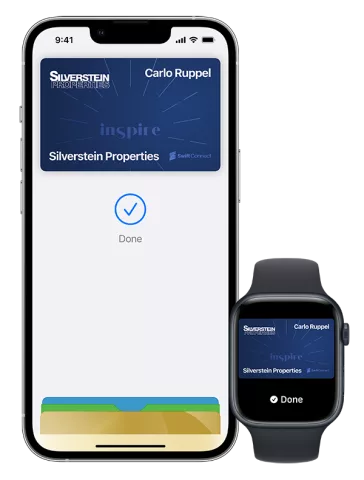
hid-apple-wallet-iphone-watch-silverstein-q1-2022-1.png

Image courtesy of Silverstein Properties, HID Global and SwiftConnect

February 7, 2022

Silverstein Properties, a leading real estate development, investment and management firm, introduced contactless access to its 7 World Trade Center office building through an employee badge in Apple Wallet.

Silverstein Properties is a privately held, full-service real estate development, investment and management firm based in New York. Founded in 1957 by Chairman Larry Silverstein, the company has developed, owned, and managed more than 40 million square feet of commercial, residential, retail, and hotel space.

Silverstein’s employee badges in Apple Wallet allow users to easily access its office buildings, tenant floors, fitness centers and amenity spaces using their iPhone or Apple Watch. Starting at the 7 World Trade Center, the company plans to offer the service to its 50,000 office users in New York, Philadelphia and Los Angeles in the coming months.

“We are proud to make it easy for our employees and [users] to get into our buildings, their offices, and our shared lounges, cafes, conference facilities and yoga studios using employee badge in Apple Wallet on iPhone and Apple Watch,” said Tal Kerret, President of Silverstein Properties. “Through our Inspire app, we can now provide and manage access to any number of buildings and spaces in a safe and secure way.”

How it works:

  • Seamless Set-up: Employees and tenants can add their employee badge to Apple Wallet after an initial set-up through Silverstein’s Inspire app. Once added, the badge will allow them to enter their office building, office space and shared fitness and amenity spaces. Unlike the physical cards, there is no waiting time for new employees to obtain building credentials and access.
  • Simply Tap iPhone or Apple Watch to Unlock: Once an employee badge is added to Apple Wallet on iPhone or Apple Watch, users can hold their device near the door’s NFC-enabled lock to access secured areas. With Express Mode, tenants don’t need to unlock their device to use their badge in Apple Wallet. If their iPhone needs to be charged, they can still use the device to access their office or amenity areas for up to five hours with Power Reserve.
  • More Secure and Private: Employee badges in Apple Wallet are stored on personal devices and take full advantage of the privacy and security built into iPhone and Apple Watch. When a Silverstein employee uses a badge in Apple Wallet, it is never shared with Apple or stored on Apple servers. If their iPhone or Apple Watch is misplaced, the device owner can promptly use the Find My app to lock the device and help locate it.

Employee badges in Apple Wallet are provisioned from Silverstein’s Inspire app, using SwiftConnect Access Cloud, which manages and connects disparate access control systems across owner and enterprise portfolios with mobile credential platforms, user directories, and other systems that influence physical access requirements. SwiftConnect’s Access Cloud and Silverstein’s Inspire app integrate with HID Origo, a cloud platform that enables lifecycle management of mobile credentials. The solution leverages HID’s Seos credential technology. To deliver this access experience, employee badges stored in Apple Wallet work in Power Reserve mode when the iPhone needs a charge.

KEYWORDS: access control contactless mobile credentials risk management

Share This Story

Looking for a reprint of this article?
From high-res PDFs to custom plaques, order your copy today!

Recommended Content

JOIN TODAY
To unlock your recommendations.

Already have an account? Sign In

  • Iintegration and use of emerging tools

    Future Proof Your Security Career with AI Skills

    AI’s evolution demands security leaders master...
    Security Education & Training
    By: Jerry J. Brennan and Joanne R. Pollock
  • The 2025 Security Benchmark Report

    The 2025 Security Benchmark Report

    The 2025 Security Benchmark Report surveys enterprise...
    The Security Benchmark Report
    By: Rachelle Blair-Frasier
  • The Most Influential People in Security 2025

    Security’s Most Influential People in Security 2025

    Security Magazine’s 2025 Most Influential People in...
    Most Influential People in Security
    By: Security Staff
Manage My Account
  • Security Newsletter
  • eMagazine Subscriptions
  • Manage My Preferences
  • Online Registration
  • Mobile App
  • Subscription Customer Service

More Videos

Sponsored Content

Sponsored Content is a special paid section where industry companies provide high quality, objective, non-commercial content around topics of interest to the Security audience. All Sponsored Content is supplied by the advertising company and any opinions expressed in this article are those of the author and not necessarily reflect the views of Security or its parent company, BNP Media. Interested in participating in our Sponsored Content section? Contact your local rep!

close
  • critical event management
    Sponsored byEverbridge

    Why a Unified View Across IT, Continuity, and Security Makes or Breaks Crisis Response

  • Charlotte Star Room
    Sponsored byAMAROK

    In an Uncertain Economy, Security Is a Necessity - Not an Afterthought

  • Sureview screen
    Sponsored bySureView Systems

    The Evolution of Automation in the Command Center

Popular Stories

Cybersecurity trends of 2025

3 Top Cybersecurity Trends from 2025

Red laptop

Security Leaders Discuss SitusAMC Cyberattack

Green code

Logitech Confirms Data Breach, Security Leaders Respond

Neon human and android hands

65% of the Forbes AI 50 List Leaked Sensitive Information

The Louvre

After the Theft: Why Camera Upgrades Should Begin With a Risk Assessment

Top Cybersecurity Leaders

Events

September 18, 2025

Security Under Fire: Insights on Active Shooter Preparedness and Recovery

ON DEMAND: In today’s complex threat environment, active shooter incidents demand swift, coordinated and well-informed responses.

December 11, 2025

Responding to Evolving Threats in Retail Environments

Retail security professionals are facing an increasingly complex array of security challenges — everything from organized retail crime to evolving cyber-physical threats and public safety concerns.

View All Submit An Event

Products

Security Culture: A How-to Guide for Improving Security Culture and Dealing with People Risk in Your Organisation

Security Culture: A How-to Guide for Improving Security Culture and Dealing with People Risk in Your Organisation

See More Products

Related Articles

  • City Worker iPhone.jpg

    London city workers can add employee badge to Apple Wallet

    See More
  • George Anderson

    George Anderson, World Trade Center Security Director for the Port Authority of New York and New Jersey, to Receive 2019 SIA Insightful Practitioner Award

    See More
  • Head of Security for World Trade Center Resigns

    See More

Related Products

See More Products
  • 150952519X.jpg

    Intelligence in An Insecure World, 3rd Edition

  • security culture.webp

    Security Culture: A How-to Guide for Improving Security Culture and Dealing with People Risk in Your Organisation

  • Physical Security and Safety: A Field Guide for the Practitioner

See More Products
×

Sign-up to receive top management & result-driven techniques in the industry.

Join over 20,000+ industry leaders who receive our premium content.

SIGN UP TODAY!
  • RESOURCES
    • Advertise
    • Contact Us
    • Store
    • Want More
  • SIGN UP TODAY
    • Create Account
    • eMagazine
    • Newsletter
    • Customer Service
    • Manage Preferences
  • SERVICES
    • Marketing Services
    • Reprints
    • Market Research
    • List Rental
    • Survey/Respondent Access
  • STAY CONNECTED
    • LinkedIn
    • Facebook
    • YouTube
    • X (Twitter)
  • PRIVACY
    • PRIVACY POLICY
    • TERMS & CONDITIONS
    • DO NOT SELL MY PERSONAL INFORMATION
    • PRIVACY REQUEST
    • ACCESSIBILITY

Copyright ©2025. All Rights Reserved BNP Media.

Design, CMS, Hosting & Web Development :: ePublishing