Securing PC Users, In Spite of Themselves

With risk more complicated and diverse, security measures for the enterprise network and its many devices become more important.
An increasingly mobile workforce, device proliferation, greater legal responsibilities and the rising value of corporate data assets all impact security for today’s enterprise client environment. Add to that the fact that more physical security systems, including video, are working through the enterprise network.
PC users can exacerbate the already challenging situation by intentionally or unintentionally disabling a security program or ignoring a recommended security patch download. As risk factors become more complicated and diverse, security measures for the enterprise network and its many devices become more important, and need to become capable, than ever before.
While the industry is at the earliest stages of moving to the next generation of client security, with more advanced security tools that are built in and readily available, fundamental measures remain the foundation.
Secure Configuration Management is essential for Intel, where security must support 34,000 desktops, more than 70,000 notebooks and more than 5,000 wireless access points.
DON’T FORGET SECURE CONFIGURATION MANAGEMENT
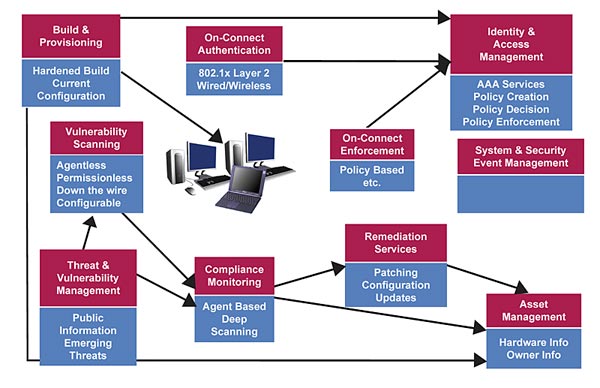
Chief security officers and their colleague chief information officers all too frequently discuss protecting the client environment in terms of attack prevention. But secure configuration management is equally, if not more, important to protecting corporate assets. While not a cure-all for PC security, secure configuration management is an integrated and pragmatic approach to protecting devices and the network despite user mischief and other factors. Intel’s IT group supports 34,000 desktops, more than 70,000 notebooks and more than 5,000 wireless access points. Secure configuration management is central to our internal security strategy.How to proceed with secure configuration management depends on the company, the risks it faces, the desktop and mobile composition of the client fleet and the time and funds available. For a smaller company with limited IT resources, improving fundamentals such as system builds and asset tracking is a good start. Hardening clients before giving them to users and putting processes in place to monitor PCs and other devices throughout their lifecycle are key. Best practices for hardening builds are readily available in the public domain, while many security news groups offer freeware and shareware versions of threat and vulnerability management solutions. Check the accompanying chart for fundamental elements as well as some advanced features of the secure configuration management domain.
BUILDING AND PROVISIONING
Regardless of the environment, the building and provisioning of clients is the first element in the secure configuration management domain. It includes receiving and imaging the client with its operating system and applications, and giving the system its identity as it joins the active directory and repository. At this stage, the client initially ties into the identity and access management system, and other authentication and authorization services, registers its owner and hardware information with asset management and the audit trail for the device begins. The inventory tracking these elements will be completely automated in next generation clients. Proper build and provisioning ensure the client is as resistant as possible to attacks and that only authorized devices connect to the corporate network.The next element in secure configuration management is threat and vulnerability management, which serves as an early warning system to publicly disclosed dangers. It informs IT professionals of emerging threats and enables them to assess how exposed the network and clients may be to a particular vulnerability. The pragmatic, holistic approach is to use this information to gauge the potential impact of a threat and determine how hard and fast to move. If, for example, threat and vulnerability management receives a warning regarding a particular operating system, the right person can be called in to assess the number of devices and people at risk and determine whether standard or emergency procedures are in order. Monitoring the threat and vulnerability landscape not only feeds into our vulnerability scanning and compliance monitoring capabilities, but combined with internal monitoring of different channels also enables us to create and enforce new security policies.
“DOWN THE WIRE” SCANNING
Vulnerability scanning follows in our secure configuration management process, which is a “down the wire” scanning capability that provides us with a macro view of the security posture of the network and its devices. While deeper scanning requires an agent or permission, our initial vulnerability scanning does not require discreet interaction with the client or the installation of permissions. It gives us a broad, preliminary look at all the devices and services on the network to see if any are vulnerable to known exploits. We can discover and monitor the whole environment, even with thousands of devices, switches, IP addresses, applications and operating systems on the network. Vulnerability scanning precedes compliance monitoring.In compliance monitoring, the agent does have authority to scan on a deeper level to give us a detailed, per-device view of the environment. With certain threats, assessing them and taking appropriate action requires information, such as the particular application version or the date the software was created. Based on the results of the compliance monitoring utility, a client may be referred to remediation services that can make registry modifications and enable us to remotely modify the client when needed. Essentially, the compliance monitoring tool consumes the data from the threat and vulnerability management and vulnerability scans to do intense scanning. Where there are gaps between the two, remediation services brings the client up to date.
HOLISTIC UNDERSTANDING OF RISK
The goal is to gain a holistic understanding of risk exposure and to ensure that the security tools in place are both working and in use. As we move to the next generation of clients, automatic update capabilities will reduce the sometimes heroic efforts security and IT departments undertake just to stay current on threat protection. Automatic updates will not only eliminate the need for the user to accept a new security tool, but also will occur invisibly in the background, remotely and regardless of the system state. Automated compliance monitoring further assures that patches are applied when required, giving a higher degree of confidence in rapid compliance as the user no longer determines if and when it happens. It is a faster path to goal of 95 percent confidence, particularly around immediate or code red concerns.In our secure configuration management domain two highly advanced elements give us added protection.
On-connect authentication is a utility that requires devices to prove their identity before becoming a part of the production network, which protects the production network from rogue devices.
On-connect enforcement ensures that the device is known and has the correct security updates and patches in place. If a device is deficient, it is referred to remediation services, which first correct and then connect the device to the production network. Both on-connect utilities are emerging capabilities that play an important role in the proactive protection of the network and its devices.
Throughout the secure configuration management domain there are a number of interactions and dependencies. Among these dependencies is the reliance of the on-connect authentication and on-connect enforcement utilities on the identity and access management for both authorization and policy data. Both vulnerability scanning and compliance monitoring also depend heavily on the information provided threat and vulnerability management system. On-connect enforcement relies on the processes of the on-connect authentication and compliance monitoring utilities to properly enforce its policies.
Finally, the system and security event management depends on all elements of the secure configuration management to properly collect, aggregate, correlate, report and archive the lifecycle of the network and devices, and the threats they encounter.
Regardless of the size and complexity of the network in question, we are all challenged to keep each PC, user and the network as a whole safe from a growing number of threats and vulnerabilities. This includes physical security systems now part of the IT infrastructure. The mobility of the workforce, legal responsibilities and the value of corporate data assets will undoubtedly continue to grow, and PC users will continue to make mistakes that are potentially dangerous to the network. At its most fundamental and advanced, secure configuration management is a key to addressing these challenges.
Looking for a reprint of this article?
From high-res PDFs to custom plaques, order your copy today!