Security Magazine logo
search
cart
facebook twitter linkedin youtube
  • Sign In
  • Create Account
  • Sign Out
  • My Account
Security Magazine logo
  • NEWS
    • Security Newswire
    • Technologies & Solutions
  • MANAGEMENT
    • Leadership Management
    • Enterprise Services
    • Security Education & Training
    • Logical Security
    • Security & Business Resilience
    • Profiles in Excellence
  • PHYSICAL
    • Access Management
    • Fire & Life Safety
    • Identity Management
    • Physical Security
    • Video Surveillance
    • Case Studies (Physical)
  • CYBER
    • Cybersecurity News
    • More
  • BLOG
  • COLUMNS
    • Career Intelligence
    • Cyber Tactics
    • Cybersecurity Education & Training
    • Leadership & Management
    • Security Talk
  • EXCLUSIVES
    • Annual Guarding Report
    • Most Influential People in Security
    • The Security Benchmark Report
    • Top Guard and Security Officer Companies
    • Top Cybersecurity Leaders
    • Women in Security
  • SECTORS
    • Arenas / Stadiums / Leagues / Entertainment
    • Banking/Finance/Insurance
    • Construction, Real Estate, Property Management
    • Education: K-12
    • Education: University
    • Government: Federal, State and Local
    • Hospitality & Casinos
    • Hospitals & Medical Centers
    • Infrastructure:Electric,Gas & Water
    • Ports: Sea, Land, & Air
    • Retail/Restaurants/Convenience
    • Transportation/Logistics/Supply Chain/Distribution/ Warehousing
  • EVENTS
    • Industry Events
    • Webinars
    • Solutions by Sector
    • Security 500 Conference
  • MEDIA
    • Interactive Spotlight
    • Photo Galleries
    • Podcasts
    • Polls
    • Videos
      • Cybersecurity & Geopolitical Discussion
      • Ask Me Anything (AMA) Series
  • MORE
    • Call for Entries
    • Classifieds & Job Listings
    • Continuing Education
    • Newsletter
    • Sponsor Insights
    • Store
    • White Papers
  • EMAG
    • eMagazine
    • This Month's Content
    • Advertise
  • SIGN UP!

Plant Security: Who Needs a PC?
February 1, 2005
Devices using USB-over-IP technology can bring sophisticated biometrics to remote plant doorways without expensive PCs.
Biometrics devices in plants and manufacturing research facilities identify people by taking a reading of some part of the body and matching the profile to a database. Common biometrics includes iris, retina, facial, hand and finger scanners. Many of these devices are Universal Serial Bus (USB)-attached and require a personal computer (PC) for processing data. This requirement historically limited use to logical access, like logging on to a computer via fingerprint. To implement these devices for door access, customers often purchase sophisticated biometrics terminals that can cost upwards of $1,000 each.

Count Me In LLC of Mount Prospect, Ill., a biometrics manufacturer, wanted to offer its customers an easy, affordable way to implement USB finger-scan devices and relays for access control. The company’s primary obstacle was eliminating the expense of installing a PC biometrics terminal at each doorway. They also wanted to utilize the Ethernet infrastructure already in place at customer sites.
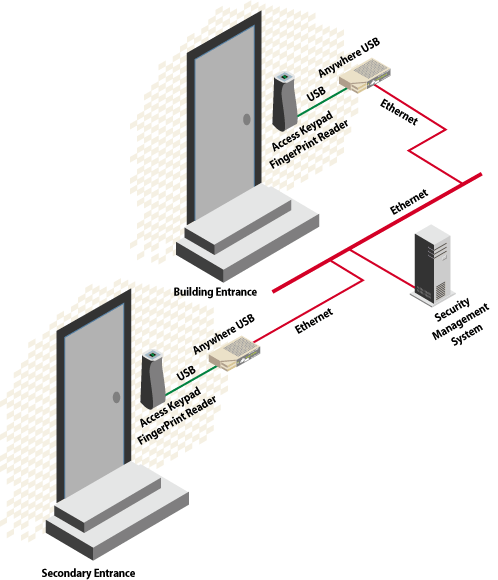
USB enabling technology allows easy integration into existing networking infrastructure.

USB hub approach

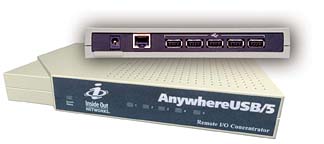
The company tested AnywhereUSB/5 from Digi of Minneapolis. The Ethernet-enabled USB hub employs USB-over-IP technology, allowing such devices to be connected anywhere on a network without a locally attached host PC. Instead of having a PC or expensive terminal at each point of entry, the manufacturer could offer the hub for roughly half the cost of a traditional biometrics terminal.

“Digi enabled a more cost effective and flexible solution,” said Neal Katz, vice president of Count Me In LLC. “We extended our technology’s use by implementing the AnywhereUSB in conjunction with our Door Monitor access control system. This allows us to take advantage of a building’s existing wiring and go into areas where PCs are not conducive. Our Door Monitor is now of value in increased applications, and the cost to our customers is reduced.”

Implementing the technology involves three basic steps. First, the company connects the hub and accompanying finger-scan device at each doorway to an Ethernet via RJ-45 cable. Next, the access control application software is installed on a single host in the main security office. Third, USB-over-IP software drivers are loaded onto the same host.

This software acts as a COM port redirector; it makes the host think that the remote AnywhereUSB devices are locally attached. All processing happens at the remote host, resulting in fewer points of failure and less risk of tampering. Connecting the biometrics device to the AnywhereUSB provides a cost-effective alternative to traditional host-based access control systems.

Count Me In’s Door Monitor access control system is used to monitor and control people who are allowed to enter a building or room. It combines the company’s biometrics fingerprint with easy-to-customize software.

Share This Story

Looking for a reprint of this article?
From high-res PDFs to custom plaques, order your copy today!

Recommended Content

JOIN TODAY
To unlock your recommendations.

Already have an account? Sign In

  • Iintegration and use of emerging tools

    Future Proof Your Security Career with AI Skills

    AI’s evolution demands security leaders master...
    Security Education & Training
    By: Jerry J. Brennan and Joanne R. Pollock
  • The 2025 Security Benchmark Report

    The 2025 Security Benchmark Report

    The 2025 Security Benchmark Report surveys enterprise...
    The Security Benchmark Report
    By: Rachelle Blair-Frasier
  • The Most Influential People in Security 2025

    Security’s Most Influential People in Security 2025

    Security Magazine’s 2025 Most Influential People in...
    Most Influential People in Security
    By: Security Staff
Manage My Account
  • Security Newsletter
  • eMagazine Subscriptions
  • Manage My Preferences
  • Online Registration
  • Mobile App
  • Subscription Customer Service

More Videos

Sponsored Content

Sponsored Content is a special paid section where industry companies provide high quality, objective, non-commercial content around topics of interest to the Security audience. All Sponsored Content is supplied by the advertising company and any opinions expressed in this article are those of the author and not necessarily reflect the views of Security or its parent company, BNP Media. Interested in participating in our Sponsored Content section? Contact your local rep!

close
  • critical event management
    Sponsored byEverbridge

    Why a Unified View Across IT, Continuity, and Security Makes or Breaks Crisis Response

  • Charlotte Star Room
    Sponsored byAMAROK

    In an Uncertain Economy, Security Is a Necessity - Not an Afterthought

  • Sureview screen
    Sponsored bySureView Systems

    The Evolution of Automation in the Command Center

Popular Stories

Digital, tablet and hands

The 2025 Annual Guarding Report: Unrest Inspires Upgrades in Training, Technology

Cybersecurity trends of 2025

3 Top Cybersecurity Trends from 2025

Red laptop

Security Leaders Discuss SitusAMC Cyberattack

Cybersecurity predictions of 2026

5 Cybersecurity Predictions for 2026

Water faucet and cup

High Water Mark: CISA Shares Foundations for Effective Cybersecurity and Risk Management

Top Cybersecurity Leaders

Events

September 18, 2025

Security Under Fire: Insights on Active Shooter Preparedness and Recovery

ON DEMAND: In today’s complex threat environment, active shooter incidents demand swift, coordinated and well-informed responses.

January 14, 2026

Is Your Organization Prepared to Navigate Interconnected Threats in 2026?

The 2026 threat environment will be louder, faster, and more interconnected. The most pressing risks, from global political volatility to emerging tech disruptions, will challenge organizations to act amid ambiguity and protect credibility in an era of accelerating uncertainty.

View All Submit An Event

Products

Security Culture: A How-to Guide for Improving Security Culture and Dealing with People Risk in Your Organisation

Security Culture: A How-to Guide for Improving Security Culture and Dealing with People Risk in Your Organisation

See More Products

Related Articles

  • Woman working on computer

    Why every business needs a data security strategy

    See More
  • McDonalds

    AI overhaul at McDonald’s needs a super-sized security approach

    See More
  • Why Security Needs a ‘Great Conversation’

    See More

Related Products

See More Products
  • Physical Security and Safety: A Field Guide for the Practitioner

  • security culture.webp

    Security Culture: A How-to Guide for Improving Security Culture and Dealing with People Risk in Your Organisation

  • physical security.webp

    Physical Security Assessment Handbook An Insider’s Guide to Securing a Business

See More Products
×

Sign-up to receive top management & result-driven techniques in the industry.

Join over 20,000+ industry leaders who receive our premium content.

SIGN UP TODAY!
  • RESOURCES
    • Advertise
    • Contact Us
    • Store
    • Want More
  • SIGN UP TODAY
    • Create Account
    • eMagazine
    • Newsletter
    • Customer Service
    • Manage Preferences
  • SERVICES
    • Marketing Services
    • Reprints
    • Market Research
    • List Rental
    • Survey/Respondent Access
  • STAY CONNECTED
    • LinkedIn
    • Facebook
    • YouTube
    • X (Twitter)
  • PRIVACY
    • PRIVACY POLICY
    • TERMS & CONDITIONS
    • DO NOT SELL MY PERSONAL INFORMATION
    • PRIVACY REQUEST
    • ACCESSIBILITY

Copyright ©2025. All Rights Reserved BNP Media.

Design, CMS, Hosting & Web Development :: ePublishing